Zendesk Talk Review (2026): Demo, Real Pricing, and the Recording Problem
Doug Breaker · August 11, 2026
If your team already lives in Zendesk, Zendesk Talk is the easiest way to add phone support. That is the short version of this review. Two things are easy to miss, though. The plan tier you need for card payments costs double the entry tier. And if your customers read card numbers over the phone, those numbers stay in the recordings stored in your Zendesk account.
Zendesk Talk is Zendesk's built-in phone system. You buy a number inside Zendesk, and your agents take calls in the same window where they answer tickets. Calls become tickets, with the audio attached when recording is on.
I ran a support team of 40 agents taking about 5,000 calls a week, and we took orders by phone. Today my company processes call recordings for teams on Zendesk Talk. We have handled more than 2 million of them in the past two years, over 220,000 hours of audio. Our software scans every one of those recordings for card numbers, so I know what ends up in them. And to be clear about my stake: we sell the tool that removes them.
Is it Zendesk Talk or Zendesk Voice?
It's both, and that's confusing. Zendesk renamed Talk to "Zendesk Voice" on its marketing site. As of August 2026, the Voice product page doesn't say "Talk" once. But the help center, the admin settings, and the per-minute rate card still say Talk. One Zendesk blog post is titled "6 easy steps to trial Zendesk Talk", and the web address of that same post says Voice. It's the same product with two names, caught mid-rename. If you see Voice on Zendesk's website and Talk in your admin panel, you aren't missing something.
What Zendesk Talk does well
The core idea holds up. Your phone channel lives inside your ticket system, with no integration work and no second vendor to manage.
A call comes in and the agent answers in the browser, with the caller's ticket history on the same screen. After hangup, the recording lands on the ticket. On a standard setup that is audio only: voicemails get transcribed automatically, and Zendesk sells per-minute transcription for regular calls as an extra. You can pull up any call and listen to it from the same ticket where you read the emails, with no second system to log into. Bigger teams run their whole QA review that way.
We run a Talk instance ourselves, and each setup step took minutes, not days. You pick a number in the admin center, toggle on your agents, and set business hours and a greeting. The rest of the phone-system basics exist too. You get routing, recorded press-1-for-orders menus (Zendesk calls these IVR), voicemail, callbacks, and transfers where the agent stays on to introduce the caller. They're spread across the higher tiers and add-ons, so check Zendesk's plan comparison for which tier has which, because the packaging moves around.
One limit worth naming up front: Talk is a support phone system, not a sales dialer. Heavy outbound teams will miss power-dialer features. Call quality rides on each agent's network, and office firewalls and VPNs cause their share of trouble. When the internet gets shaky mid-call, Zendesk switches into a degraded mode and some buttons on the agent's call screen stop working.
The demo Zendesk doesn't give you
We hit an odd gap while researching this review. Zendesk's demo library has interactive tours for ticketing, AI agents, and HR workflows. As of August 2026 it has none for the phone product, and the contact-sales form asks for eight fields before anyone shows you anything. The trial gives you a live number for 14 days, but no demo page shows you what a call looks like.
So here is the two-minute version, from our own instance.
- Buy a number. One screen: Admin Center, then Channels, then Talk, then a country, then a number. Our US number costs $1 a month.
- Turn on an agent. A toggle next to their name.
- Call the number. The agent's browser rings, they answer with a headset, and Zendesk creates the ticket while they talk.
What lands on the ticket
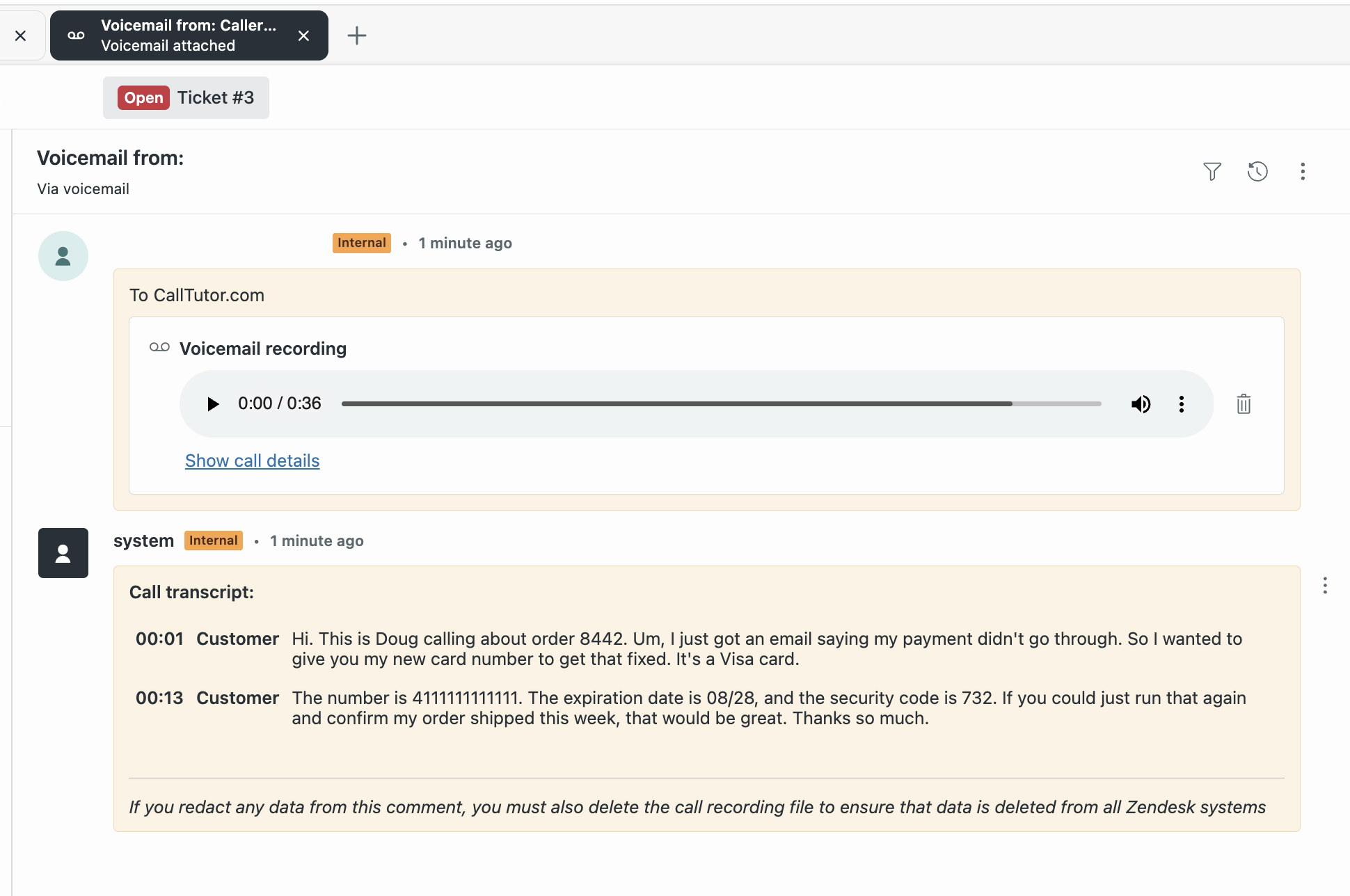
A few minutes after the call ends, the recording shows up as an audio player right on the ticket. Normal calls get the audio only. Voicemails also get transcribed automatically, and that transcript is worth a close look. This is a real voicemail from our test line. The call was ours, and the card is a test card.
The caller read out a card number to fix a failed payment. The number, expiration date, and security code all sit in the ticket in plain text, and the audio holds the same digits. Note Zendesk's own fine print at the bottom: redact the comment and you must delete the recording file too. A full card number is now stored in Zendesk, readable by anyone who can open the ticket. The recordings section below covers what to do about it.
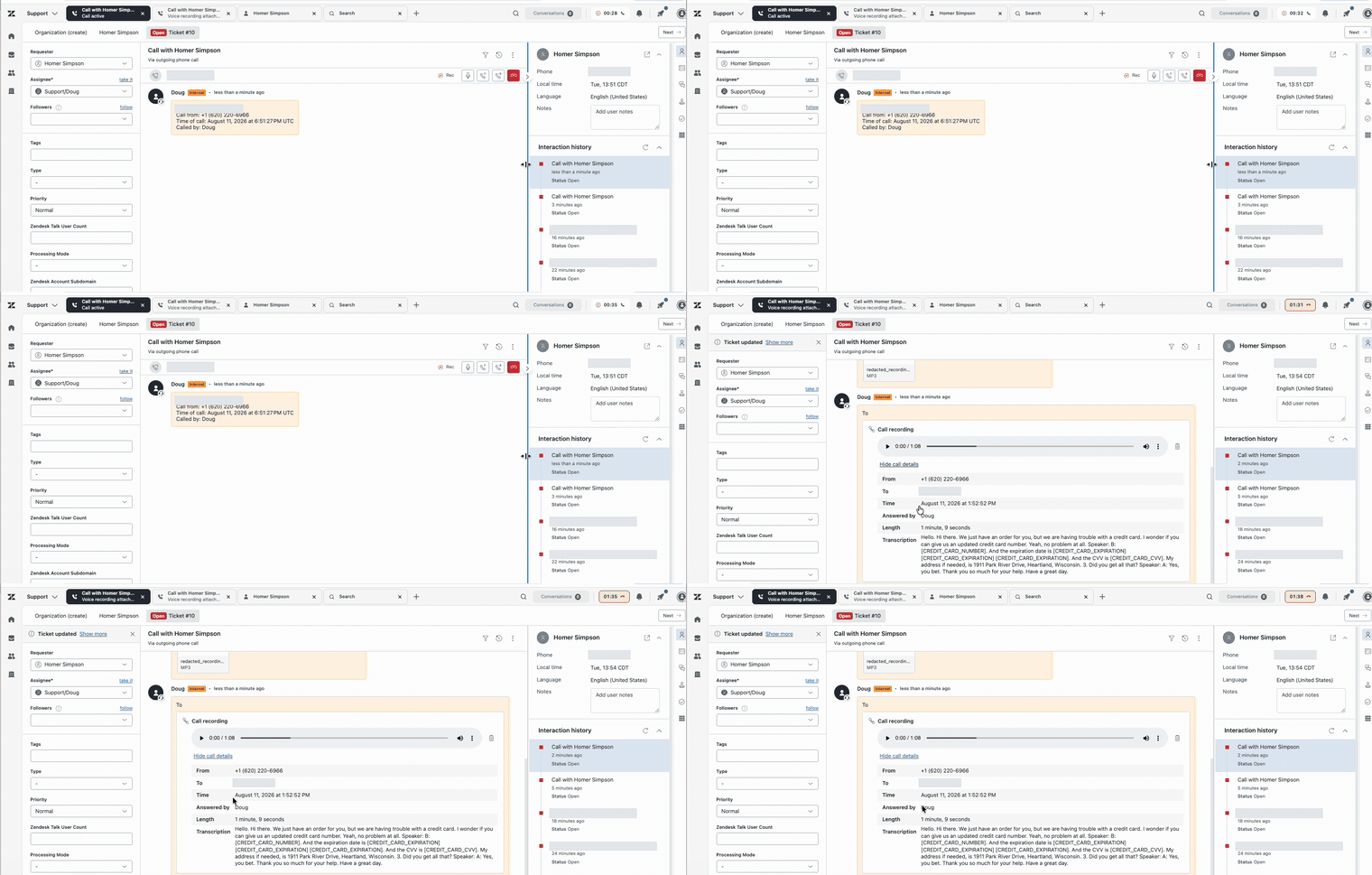
Watch a full call, start to finish
The call runs live on the ticket, and a couple of minutes after hangup the cleaned-up recording and transcript post back. The redaction at the end is our app's doing, not Zendesk's; more on that below. The caller is renamed and the phone number is blurred.
If you want to try Talk yourself, the trial costs nothing to start. You get 14 days, no credit card, and $1 of calling credit, good for about 50 minutes of test calls.
Zendesk Talk pricing in 2026: what it really costs
Talk comes bundled with Zendesk Suite plans: you pay per agent for the seat, and the phone usage bills on top, by the minute. The pricing page shows the seats. The per-minute rates live on a separate rate card in the help center. Budgets go wrong on the plan tier, not on the usage, and the table shows why.
The table below prices a five-agent team taking 2,000 minutes of inbound US calls a month, on annual billing, at prices published in August 2026. Outbound, toll-free, and international minutes bill at their own rates on the same rate card. You pick one seat tier; the number, the minutes, and any add-ons stack on top of it.
| What | Price | Five agents |
|---|---|---|
| Suite Team seats | $55 per agent per month | $275/mo |
| Suite Professional seats | $115 per agent per month | $575/mo |
| Suite Enterprise seats | Not published (~$169 per agent, estimate) | ~$845/mo (estimate) |
| Phone number (US) | $1 per month | $1/mo |
| Inbound minutes (US) | $0.016 per minute | ≈ $32/mo |
| Call recording | $0.003 per minute | ≈ $6/mo |
| Post-call transcription | $0.01 per minute | ≈ $20/mo |
| Copilot add-on (optional) | $50 per agent per month | $250/mo |
| Workforce Engagement bundle (optional) | $50 per agent per month | $250/mo |
| All-in: one seat tier + number + usage | ≈ $334/mo on Team, ≈ $634/mo on Professional |
Running the phones alone? One agent taking 400 minutes a month pays about $68 on Suite Team, or about $128 on Professional. (Monthly billing runs higher: $69 and $149 per seat instead of $55 and $115.)
Phone usage is cheap; for the five-agent team it runs about $60 a month. The money is in the tier, because the feature that decides your tier is a button. The pause-recording control is what an agent presses so a card number stays out of the recording. It requires Suite Professional or above, so a team that takes card payments can't stay on Suite Team. If you take cards by phone, you need Suite Professional, and that is $300 more a month for five agents. Advanced IVR and QA are separate add-ons on top. That is the honest version of "Talk is included with Suite."
One more line on the pricing page matters if you take cards by phone. Suite Professional and Enterprise include a feature named "credit card redaction," which Zendesk describes as: "Redact credit card numbers in a custom field to prevent the credit card number from being stored in Zendesk." The description covers a custom text field on the ticket. It says nothing about the recording or the transcript.
The part every setup guide skips: what's in your recordings
Talk can record every call, and teams turn recording on because QA and disputes want it. The recording is also a filing cabinet. On a phone order, the customer reads their card number out loud. The agent types it into the payment screen, the charge goes through, everyone hangs up happy. But the recording kept a perfect copy of those digits, and any transcript writes them down. That recording now sits in Zendesk, attached to a ticket, readable by anyone with ticket access, for as long as your retention policy keeps it.
This is not a rare edge case. Our system has fully processed more than 2 million recordings. About 1 in 6 of them contained a spoken card number, expiration date, or security code. Our customers skew toward companies that take orders by phone, so your rate may be lower. But if your phone tree has an "order by phone" branch, that is roughly what your archive looks like.
PCI DSS, the card industry's security standard, has two rules that matter here:
- The security code may never be stored after the charge.
- The card number may be stored only if it is locked down and unreadable. A recording that any agent can open from a ticket fails that test.
The fines follow an actual breach, not a spot check. If stored card data leaks, Visa can assess your payment processor, and your merchant agreement typically passes the bill to you. The published schedule runs from $5,000 for small merchants up to $100,000, and the forensic investigation is at your expense.
Zendesk's answer is the pause button. During a call, an agent on Professional or above clicks the pause-recording button in the call console while the customer reads their card, then clicks it again to resume. Both sides hear a beep, and that beep is the only confirmation. The agent has to do this on every card call, at exactly the right moment. And remember the degraded network mode from earlier: when a connection wobbles, the recording controls are on the list of features that disappear, mid-call.
In lab studies, busy adults forgot a small intended action about 25% of the time, and predicted they would forget 2% of the time. I ran a support team for years, and that matches what I saw: someone forgets on a busy Tuesday, and nobody finds out until much later. Your agents aren't careless, they're human and mid-call. A control that depends on a busy person remembering a step at the right second is not a control.
Zendesk knows the audio is the hard part. Their own transcription FAQ says Voice "can't redact PII/PCI data from call recording audio files" and points customers toward deleting the recording files. Deleting recordings works. But then QA has nothing to review and disputes have no evidence.
The tool we sell
This is the problem CallTutor exists to fix. It's our product, so weigh this part accordingly.
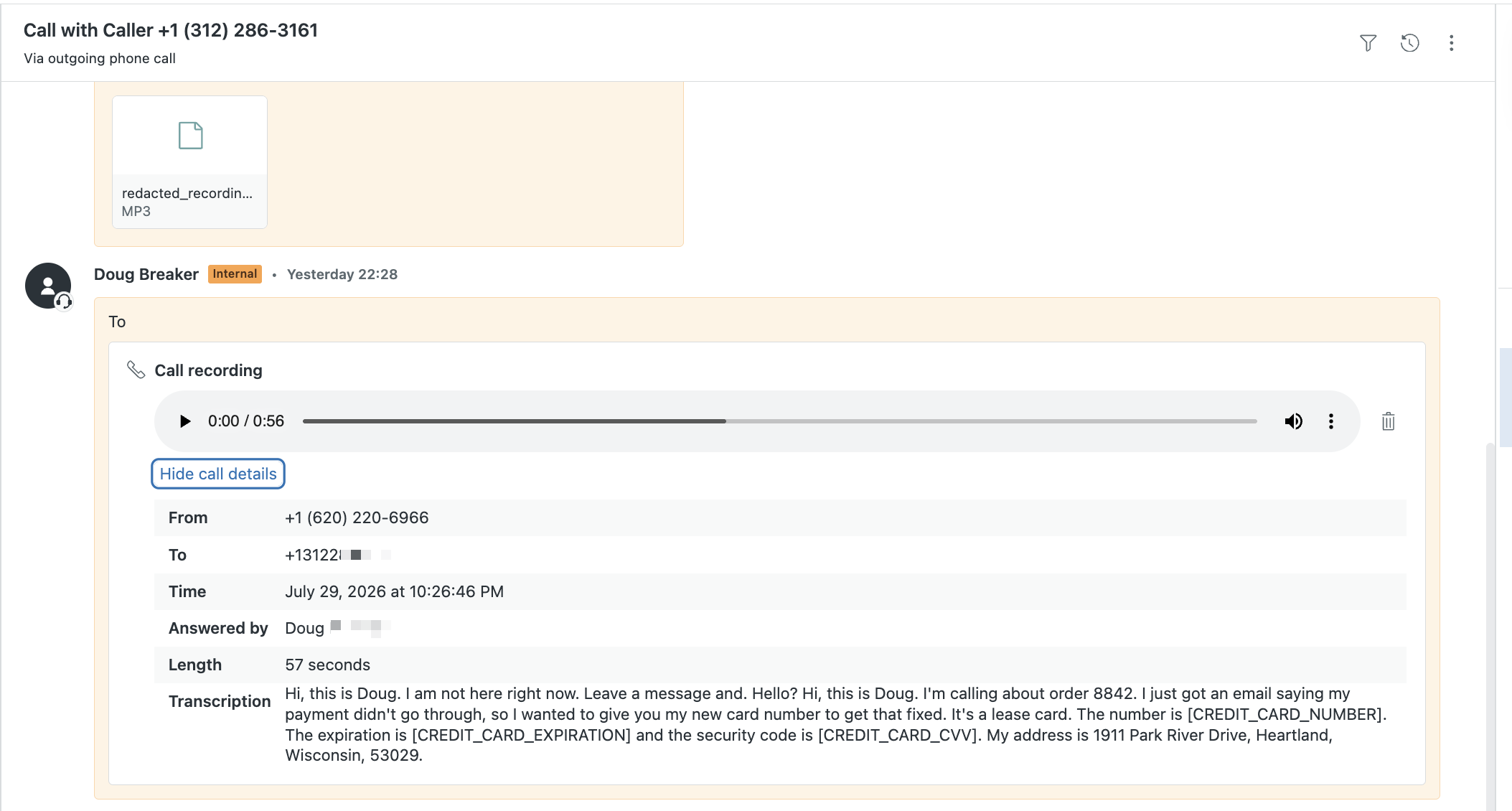
It costs $9 a month for each Talk agent who handles card calls, with no contract. It's a Zendesk marketplace app that picks up each new Talk recording after the call ends, finds spoken card numbers, and removes them from the audio and the transcript. The redacted recording posts back to the ticket minutes after hangup, and the original is deleted. Agents don't have to do anything different. You install it from the Zendesk Marketplace, connect your Zendesk with one click, and it runs on the next call.
In the years we have run it, no customer has reported a missed card number to us, which is not the same thing as a guarantee. This is the ticket from the demo section after it ran.
Here is every route to clean recordings in Zendesk, priced for the same five-agent team. Prices are as of July and August 2026; the full sourcing lives on our comparison page and in the sources below.
| Route | What you actually get | Five agents |
|---|---|---|
| CallTutor on Zendesk Talk | Card numbers removed from the audio and the transcript, original recording deleted, agents change nothing | $45/mo |
| Manual pause and resume | An agent clicks pause at the right moment on every call; the button can vanish on poor connections | $0, plus the audit risk |
| Zendesk ADPP route | Transcript-only redaction; the audio still holds the card numbers. Requires Suite Enterprise plus the Advanced Data Privacy and Protection add-on, both unpublished prices | ~$1,095+/mo |
| Zendesk Contact Center | Real audio redaction, but it is a different phone system: your calls move onto Amazon's platform ($83 per agent per month), AWS usage bills separately, and you redo your setup there | $415/mo + AWS + base plan |
The verdict
✅ Good:
- Phones inside the ticket system, with no integration work
- Setup in an afternoon
- Call history on every ticket
- Cheap usage ($0.016 per inbound US minute) and a real free trial
❌ Not good:
- The entry tier can't pause recordings
- The real per-agent cost hides across tiers and add-ons
- No native way to get card numbers out of recorded audio
- No outbound power dialer
Who should pick Zendesk Talk
Pick Talk if your support team already works in Zendesk and you want phones without an integration project. For a two-to-ten agent team doing inbound support, it is the path of least resistance, and every call's history sits on the ticket where your team already works.
Look elsewhere if you run a heavy outbound operation, need a predictive dialer, or your call volume dwarfs your ticket volume. Dedicated call-center platforms earn their complexity at that scale.
If your team takes card payments by phone, go in with your eyes open and budget for Suite Professional. Then pick your redaction route on day one:
- A few card calls a week, and you take them yourself: pause manually, and accept that you will miss some.
- Card calls every day, and you want to keep the audio for QA: add a redaction tool, about $9 per agent a month.
- Card calls every day, and you want the number never recorded at all: DTMF masking, from about $35 per user a month plus setup fees. Our DTMF masking guide compares the vendors.
- Already on Suite Enterprise, and only worried about the transcript: ADPP, about $50 per agent a month on reported prices.
Whatever you pick, don't let "the agents will pause" be the whole plan. Set this up once and the phone channel gets boring. Start with Zendesk's free trial, and our setup guide covers the redaction side.
Frequently asked questions
Is Zendesk Talk free? No. Phone capability comes with Suite plans: $55 per agent per month billed annually, or $69 billed monthly. Calls bill per minute on top: $0.016 per inbound US minute, plus $0.003 per minute for recording. There is a 14-day trial with $1 of calling credit.
Does Zendesk Talk record calls? Yes, when you turn recording on. Recording is available from Suite Team up, per Zendesk's plan comparison. Recordings attach to the ticket, and transcription bills per minute. Agents on Professional and above can pause recordings manually.
Is Zendesk Talk PCI compliant? Zendesk holding its own compliance papers does not make your recordings clean. Zendesk's docs state that Voice cannot redact card data from call recording audio and suggest deleting recording files. For phone payments that leaves manual pausing, deleting recordings, or adding an audio redaction tool.
What is the difference between Zendesk Talk and Zendesk Voice? Same product. Zendesk uses "Voice" on its marketing site and "Talk" in the help center and admin interface. The features and per-minute rates are the same under either name.
How do I get a Zendesk Talk demo? Zendesk's demo library has no voice demo as of August 2026. The fastest look is the free trial: 14 days, no credit card, and about 50 minutes of test calls on $1 of credit. The demo section above shows what a call and its ticket look like.
Sources: Zendesk pricing and the Zendesk Voice product page, fetched August 2026; Talk usage rates; call transcription FAQ; pause and resume documentation; degraded network mode; McDaniel & Einstein, Prospective Memory, SAGE 2007, ch. 9; Visa, "What To Do If Compromised," v10.0, June 2026. Suite Enterprise and ADPP prices are not published by Zendesk; figures marked ~ are as reported by Richpanel's pricing guide, June 2026. Call statistics are aggregates across our customer base. No individual customer's data is disclosed.