Zendesk Redaction: How to Redact Tickets, Calls and Transcripts
Doug Breaker · October 31, 2026

I ran a support desk that took 5,000 calls a week, and customers read us their credit card numbers. My company now cleans call recordings for Zendesk teams that take payments by phone. Between August 1 and October 30, 2026, CallTutor processed more than 180,000 Zendesk calls. We found and redacted credit card numbers in 18.9% of them, about 1 in 5.
What's the danger of not redacting? One new CallTutor customer found credit card numbers in Zendesk's own AI call transcripts on 39 tickets in three days. That's a real PCI security risk.
Where credit card numbers end up in Zendesk
Here's the short version. Each row is explained below.
| Where it shows up | What Zendesk gives you | Plan you need | Does it work? |
|---|---|---|---|
| Something an agent or customer typed | Redact it by hand | Team and up | Yes, one ticket at a time |
| An attachment or image | Redact it by hand | Team and up | Yes, up to 75 at once |
| A new typed credit card number | A setting that hides it automatically | Professional and up | Yes, but only for new comments |
| Other personal info | A paid privacy add-on (ADPP) | Enterprise, plus the add-on | Yes, on open tickets |
| Text messages (SMS) | Nothing | Any | No |
| The call recording | Delete the whole recording | Professional and up | No. You can delete it, not clean it |
| Zendesk's AI call transcript | The paid privacy add-on | Enterprise, plus two add-ons | Only with the add-on |
Zendesk does a good job with what people type. It does almost nothing with what people say on the phone. That's what CallTutor does: it takes the credit card number out of the call recording and gives you a clean transcript.
How to redact a ticket in Zendesk
You need the Agent Workspace turned on. Then, from Zendesk's help article, Redacting ticket content:
- Open the ticket and find the comment.
- Click the menu on the comment and choose Mark text for redaction.
- Highlight what you want gone and click Mark for redaction. You can mark text, attachments, and images at the same time.
- Click Redact.
Admins can do this. Agents can too, if their role allows it.
Three things to know first:
- You can't undo it. Once it's gone, it's gone.
- You can't do many tickets at once. If a credit card number is in 400 old tickets, that's 400 trips through the menu, or a script.
- The customer's email doesn't change. If they emailed you the number, Zendesk cleans its copy. The copy in their inbox stays.
How to redact attachments and images
Same steps. You can mark attachments and images along with text, up to 75 at a time.
How to turn on automatic credit card redaction
Every Zendesk admin should check this setting. It hides credit card numbers people type into new tickets and comments. It keeps the first six and last four digits and blanks out the middle.
To turn it on, per Zendesk's article on automatically redacting credit card numbers:
- Go to Admin Center > Account > Security > More settings.
- Click the Zendesk Support tab and find Redaction.
- Check Redact credit card numbers and click Save.
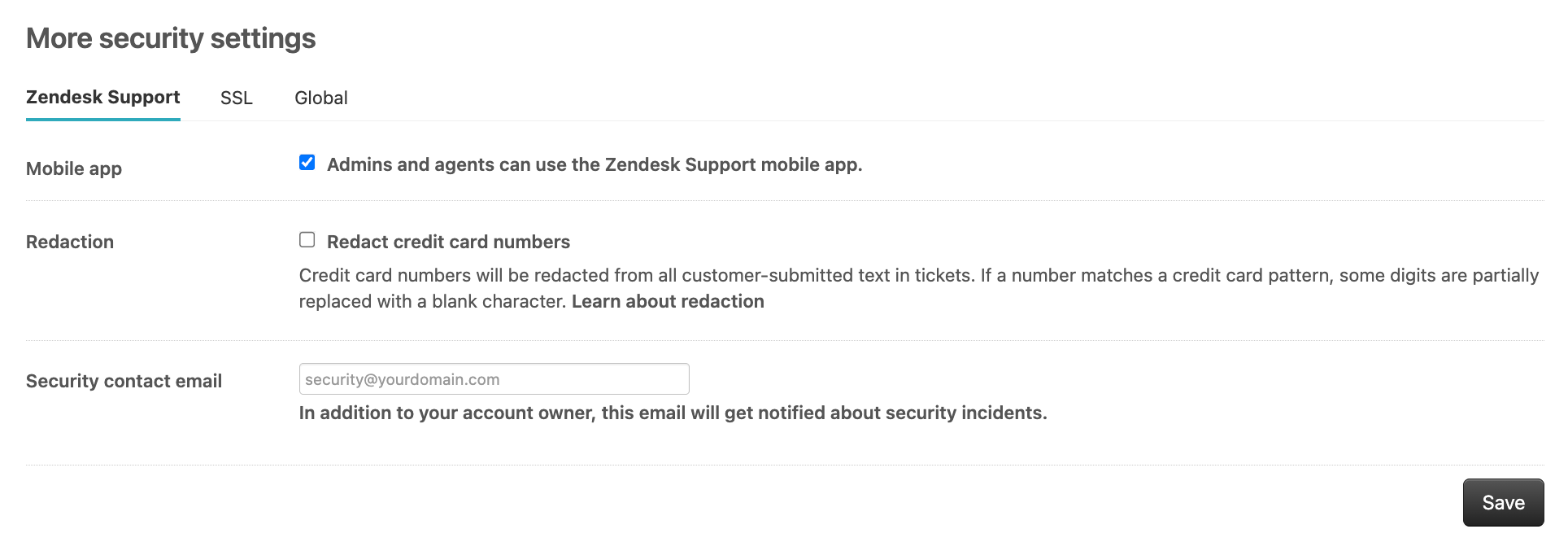
You need Suite Professional or higher. As of October 31, 2026, Zendesk's pricing page lists Suite Professional at $115 per agent a month paid yearly, or $149 paid monthly. Suite Team, at $55, doesn't have this setting.
What it won't do:
- It won't clean numbers that are already in your tickets. Only new ones.
- It won't touch phone calls, recordings, or transcripts. It's for typed text only.
CallTutor works on any Zendesk plan, Suite Team included, and it handles the phone calls this setting skips.
What the ADPP add-on does
ADPP stands for Advanced Data Privacy and Protection. It's a paid add-on, and you can only buy it on an Enterprise plan.
It adds three things, per Zendesk's ADPP overview:
- Suggestions. Zendesk highlights personal info in a ticket, and an agent clicks to remove it.
- Automatic rules. A trigger can remove personal info from open tickets on its own. Zendesk says not to use this with the automatic credit card setting, so you pick one.
- AI transcript cleanup. It removes credit card numbers and personal info from Zendesk's AI call transcripts.
Zendesk doesn't publish the price. One pricing guide puts it at about $50 per agent a month, on top of Enterprise. Ask your Zendesk rep.
Can you redact a Zendesk Talk call recording?
Not with Zendesk's own tools. You can delete it, but you can't redact it. With CallTutor, you can.
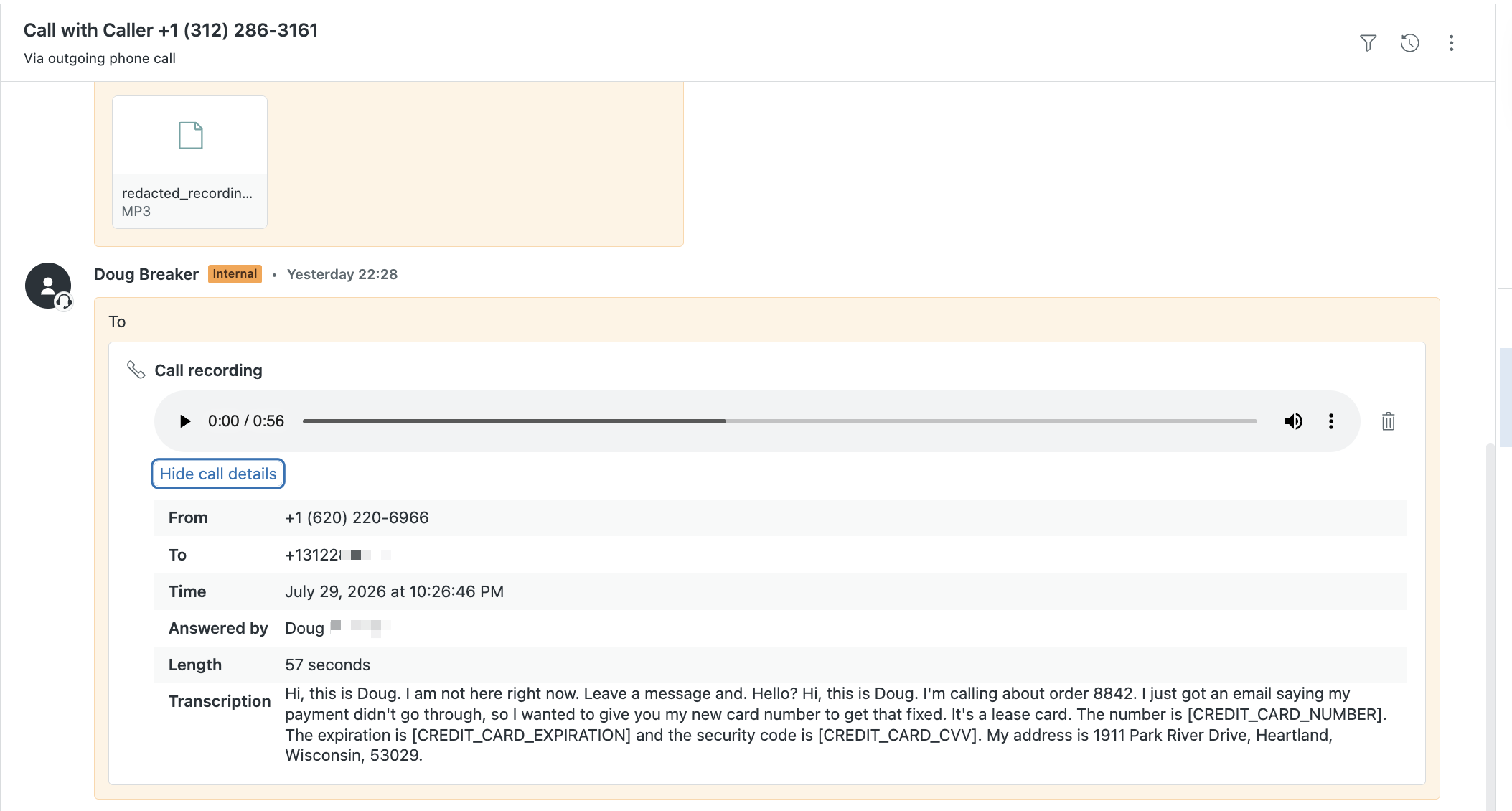
Zendesk says so in its call transcription FAQ: "Zendesk Voice can't redact PII/PCI data from call recording audio files." Their advice is to delete the recordings. Even the ADPP add-on doesn't clean the audio.
Zendesk does sell a different phone system, Zendesk Contact Center, that can clean recordings. But that means moving off Talk.
If you stay on Talk, you can delete recordings three ways:
- By hand. Only admins can do it, one ticket at a time.
- On a schedule. Each phone line has a setting to delete recordings after a set number of days.
- With the API. A developer can delete recordings with one call. Zendesk's Talk API reference has the details.
Deleting needs Suite Professional or higher, and deleted recordings can't be recovered. So Zendesk leaves you two choices: keep the whole call with the credit card number in it, or lose the whole call, including the parts your team wanted for training. CallTutor gives you a third choice: keep the call, lose only the credit card number.
And a 30-day delete rule still means the security code sits in the file for 30 days.
What about the pause button?
On Professional and Enterprise, agents can pause the recording while the customer reads their number. Both sides hear a beep.
It helps, but only if the agent remembers every single time, in the middle of a call. The agent still hears every digit. And the PCI Council says that if a pause doesn't keep the number out of the recording, you have to delete it as soon as the payment goes through. They also suggest checking recordings every week.
CallTutor doesn't need the button. It finds the credit card number after the call and cuts it out, so nobody has to remember anything.
Zendesk's AI call transcripts can include credit card numbers
Zendesk can write up a transcript and summary of each Talk call. It comes with the Copilot add-on. An admin turns it on in Admin Center > Channels > Talk and email > Talk > Settings > Transcribe and summarize call recordings on tickets.
If a caller reads out a credit card number, the transcript writes it down. Right there on the ticket, in plain text.
Zendesk only offers to clean that transcript if you have the ADPP add-on, according to its article on AI call summaries. We found no way to do it without ADPP. The automatic credit card setting doesn't cover it.
So you can have clean typed comments, a deleted recording, and the full credit card number sitting in the transcript right next to them.
What we saw: one customer's first three days
A new customer turned on CallTutor to clean their Talk recordings. The next day, their admin wrote to us:
"I set up Calltutor yesterday and while the recordings are being redacted, the call transcripts in the ticket are not. I have a PCI compliance gap I need to close quickly or try another solution."
A Zendesk Talk admin, the day after setup, October 2026
Earlier they had asked: "the transcript of the call is still showing the credit card info?"
We looked. The transcripts they saw were Zendesk's own AI transcripts. That feature had been on for three days, and 39 tickets had a credit card number in the transcript. They didn't have ADPP, so they turned Zendesk's AI transcripts off.
There was one more problem. Our clean transcript was on the ticket too, but Zendesk hides it behind a "Show call details" link that's easy to miss. So the clean one was hidden and the dirty one was in plain view. Now we can also post our transcript as its own note on the ticket, for any account that wants it.
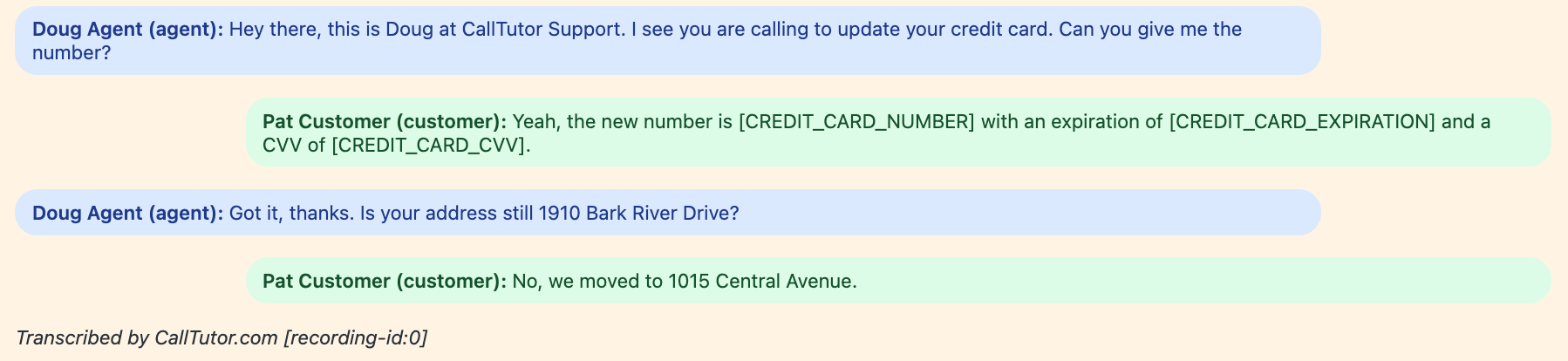
The admin didn't do anything wrong. They turned on two useful features. One cleaned the call. The other wrote it all down again.
What the PCI rules say about call recordings
PCI DSS is the set of card security rules your payment processor holds you to. The rule most people miss is about the security code, the three or four digits on the back of the card.
You can't keep the security code after the payment goes through. Not in a recording, and not even if the file is encrypted. The PCI Council says this in its FAQ on call recordings (Requirement 3.3.1) and in its guide to phone payments. If you have tools to block or remove it, they say to use them.
So a 30-day delete rule doesn't cover you, and neither does encryption. For the rest of the rules, see our guide to PCI compliance for call centers.
Three ways to keep credit card numbers out of your calls
1. Check Zendesk's AI transcripts today. Go to the Talk settings above and see which phone lines have "Transcribe and summarize call recordings on tickets" turned on. If you take payments on those lines, turn it off, unless you're on Enterprise with ADPP. On other plans, Zendesk has no way to clean those transcripts. This takes two minutes and costs nothing.
2. Keep the number off the call. With DTMF masking, the caller types their number on the phone keypad instead of saying it. The agent and the recording never hear it. It works well, but it costs more to set up. Our DTMF masking guide compares the vendors and prices. You can also text or email a payment link, but plenty of callers read the number out anyway.
3. Take it out after the call. This is what we sell, so keep that in mind. CallTutor is a Zendesk redaction app for Talk. It finds the credit card number, expiration date, and security code in each recording and cuts them out of the audio and the transcript. Redacted audio and transcript post to your ticket, the original recording is deleted from Zendesk, and transcripts are cleared from our database.
Across more than 180,000 Zendesk calls from August 1 to October 30, 2026, the typical clean recording posted 2.3 minutes after the call. 9 out of 10 posted within about 5 minutes. No reported missed PCI data in 50,000+ calls. Agents don't have to do anything different. It's $9 a month for each Talk agent who takes card payments, with no contract, and it works on English calls.
It doesn't clean Zendesk's own AI transcripts. That's why step 1 still matters.
Weighing Talk itself? Our Zendesk Talk review covers what each plan includes. Ready to try CallTutor? Install takes about a minute.
Zendesk redaction FAQ
Can you undo a redaction in Zendesk?
No. Once you click Redact, it's permanent. Before that, you can unmark anything you marked by mistake.
Can agents redact, or only admins?
Admins can. Agents can too, if their role gives them permission.
Can you redact many tickets at once?
Not in Zendesk itself. A developer can do it with Zendesk's redaction API.
Can you redact a closed ticket?
Yes, with Zendesk's redaction API. The ADPP automatic rules only work on open tickets.
Does Zendesk hide credit card numbers automatically?
Yes, in new typed comments, if an admin turns on the setting. You need Suite Professional or higher. It doesn't clean old tickets or phone calls.
Can Zendesk redact call recordings?
Not in Zendesk Talk. Zendesk says to delete the recordings instead. CallTutor can redact them, for $9 per Talk agent a month.
Does Zendesk clean credit card numbers out of its AI call transcripts?
Only if you're on Enterprise and pay for the ADPP add-on. CallTutor doesn't clean Zendesk's AI transcripts either, so turn them off on any phone line where you take payments, unless you have ADPP.
Does redacting a ticket delete the customer's original email?
No. Zendesk cleans its copy. The email in the customer's inbox stays.
How we counted
The numbers come from CallTutor's own records. We counted every call we processed and posted back to a Zendesk ticket from August 1 through October 30, 2026: 182,917 calls. We found and removed a credit card number in 34,546 of them, or 18.9%.
Timing runs from when Zendesk told us about the call, after it ended, to when the clean recording posted. Half posted within 2.3 minutes. The slowest 10% took more than 5.2 minutes. The typical call was 4.9 minutes long.
A few things to keep in mind. These are our customers' calls, not all Zendesk calls. Our customers take payments by phone, so they hear more credit card numbers than a typical help desk. One large customer makes up a big share of the total. We used totals only and didn't read any transcripts to get these numbers.
Data as of October 31, 2026. We'll update it every quarter.